WTF Cell Phone Design
A telephone is, above all else, a device you use to send and recieve telephone calls. I know this should be a statement of the obvious, but apparently the people who design cell phones have forgotten this key fact.
How many clicks does it take you to call a number you have stored in your phone?
I have to (1) click select for menu (2) click navigate down to an indecipherable icon that is supposed to be a rolodex (3) click select (4) from that menu, either select 1 or key numeral 1 to select my list of stored numbers.
Question: Why isn't my list of numbers the first thing that pops up when I open my phone? It's a telephone. I'm going to use it to call people. Why are my stored numbers buried back 4 clicks?
Instead of legislation making it illegal to operate a cell phone while driving, the authorities should focus on legistlation making it illegal to design a cell phone interface that requires the user to navigate through such an elaborate series of steps in order to access the main function of the device.
[color=gray]P.S. It's easier to take pictures than it is to place a call. I know this, because my phone takes pictures of the inside of my pocket all day long.[/color]
I was recently shopping for a new phone and the salesman was telling me about all the features of the different models. He said he rarely uses his to make phone calls. I guess it's a whole different world now.
Salesmen sell what the thing can do, not what the customer wants.
They want you to think you want what the thing can do. Did that make sense?
I have a blackberry
I normally have to push a button to take it out of sleep mode
push that button again to be told the device is locked
select the option to unlock it
type in my 5 digit password
push a button to enter those 5 digits I just typed
this takes me to the main screen, where I scroll wheel over two icons to the phone function
push a button to activate the phone feature
scroll down to the number I want to call
push a button to select that number
scroll down to select the option to call that number
push a button to place the call
There may be a faster way, but I don't know it.
I have a blackberry
...
Those are intended to be more of a multi-use device, so I wanted to give a little leeway.
I noticed that when you activate the phone feature, the stored numbers pop right up. Great! But then...
push a button to select that number
scroll down to select the option to call that number
push a button to place the call
Okay, WTF? You're on the number. There should be ONE CLICK to CALL the number!
and I exaggerate a little. The scroll wheel is also the button I push to select things, so the scrolling and selecting is all one smooth motion and should really be counted as one step. I really like the scroll wheel/button on Blackberries a lot. Very easy to use.
How many clicks does it take you to call a number you have stored in your phone?
Almost all of my calls are to Mrs. Dar or the kids. They're all at the top of my speed dial list. So three.
single-digit-number # dial-button
I can hit the call button and bring up recent contacts, scroll then click call again. But if I haven't called or heard from the person in a while its a ridiculous process to bring up my contact list.... def easier to take a picture, thats 2 clicks.
snip--
How many clicks does it take you to call a number you have stored in your phone?
--snip
As few as one.
Almost all of my calls are to Mrs. Dar or the kids. They're all at the top of my speed dial list. So three.
single-digit-number # dial-button
Almost all my calls are to Tink or Tink's work, or Tink's home or Tink's cell, or Tink's kids, etc etc... They're all on speed dial.
I have a blackberry
I normally have to push a button to take it out of sleep mode
push that button again to be told the device is locked
select the option to unlock it
type in my 5 digit password
push a button to enter those 5 digits I just typed
this takes me to the main screen, where I scroll wheel over two icons to the phone function
push a button to activate the phone feature
scroll down to the number I want to call
push a button to select that number
scroll down to select the option to call that number
push a button to place the call
There may be a faster way, but I don't know it.
Blackberry (Curve) here too. Assign a key to the Speed Dial list. Press and hold that key, number dials. Boom, baby.
It's extremely difficult to take a picture using my phone.
(For starters, there's no camera. Ba-DUM-bum!)
You need "several" clicks to get down to the number if you go through the phone book. In addition it's relatively easy (for me at least) to highlight and open a number when I thought I was dialing it. (Memo: use the "talk" button instead of "ok".)
I make liberal use of speed dial and voice recording so it doesn't bug me that much. (Of course, I don't have that many people I actually talk to. That also simplifies things.)
My current phone has voice dialing, but I've never set it up. That would be the easiest thing, especially if you don't have opposable thumbs.
...
Understood, I need to populate my speed dial list.
However, anybody I already know should be in my speed dial list will already be in my recent calls (see post #8).
So I won't gain much for the time spent activating a feature that should be a core functionality of the device. That is to say,
every number on my phone should be quickly accessible, not just a select group I have to spend my own free time to program--because the designers of the product were too thick-headed to allow the device to perform its own
main function; i.e. place phone calls.
That would be the easiest thing, especially if you don't have opposable thumbs.
[size=3]
I'LL OPPOSE YOUR THUMBS!!!1[/size]
hmm. On my little pre-paid Virgin Mobile phone; It takes only one click to get to my contact list; (plus clicks to scroll to select the person if not at the top); then one click to dial. Seems pretty easy to me.
But that's about the only thing on the phone that seems easy.
But that's about the only thing on the phone that seems easy.
Then, "Mission Accomplished" as far as I'm concerned.
I don't know about you, but I bought my phone to use as a phone.
Accessing my phone book takes two clicks, then of course the scrolling and selecting the number. But with the exception of doctors' offices, I can't remember the last time I actually needed to use it. I just dial the numbers, like some sort of philistine.
I just dial the numbers, like some sort of philistine.
does not compute :::head explodes:::
Nobody wants to hear from me, so no phone.
Then, "Mission Accomplished" as far as I'm concerned.
I don't know about you, but I bought my phone to use as a phone.
Except that the other day, when I was stranded in the Target parking lot with a flat tire in 100 degree heat, I was trying to use my phone to: call AAA; call the tire place; and I needed to add money to it. THAT was hard to figure out! ('cause I usually just do it over the 'Net).
The worst thing about cell phones (other than the annoying habit people have of talking in them) is that they're always out of juice or out of range or something in an emergency.
I believe the technical term for this kind of design is kludge.
I just dial the numbers, like some sort of philistine.
[SIZE="6"]BLASPHEMER!! OUTCAST!!! UNCLEAN!!!![/SIZE]
Blackberry (Curve) here too. Assign a key to the Speed Dial list. Press and hold that key, number dials. Boom, baby.
Vera nize.
because the designers of the product were too thick-headed to allow the device to perform its own main function; i.e. place phone calls.
You're behind the times, my friend. The main function of a cell phone, for many (most) these days is for texting. :cool:
Have you read the manual? Some phones allow you to set shortcut keys and rearrange the menus to suit your uses.
Have you read the manual? Some phones allow you to set shortcut keys and rearrange the menus to suit your uses.
It's a phone! If it can't function like a phone out-of-the-box then somebody has failed. Why do I have to do their job for them?
Flint, the problem, apparently, is that they've given you too much power.
It's a phone! If it can't function like a phone out-of-the-box then somebody has failed. Why do I have to do their job for them?
Um. Because it's got more than two buttons and you don't know how to use it yet?
Seriously, every cell phone I've had so far (1 Nokia and 2 Motorolas) was set up out of the box so that if you pushed the menu button at the main screen, your phone list came up. I can't imagine that yours doesn't have something like that. What model phone
do you have?
no - not at all HLJ - they've made assumptions and frustrated a lot of consumers who, ridiculously enough, want to use their phone as a ..... phone!
He has the new Goldberg phone, Rube model.
Didn't someone come up with a rotary dial cell phone?
Actually, I think that can be extended into a general rule. Anything with more than two buttons has underlying complexity and will require a manual.
Things that have more than two buttons that you think are intuitive are only easy for you because you have experience with some similar metaphor previously.
Didn't someone come up with a rotary dial cell phone?
I SO need to get one of those.
Cell Phone with Rotary Dial Announced
With cell phones become popular for people of all walks of life, a new company
AARPwireless has announced an easy-to-use
cell phone for the elderly set that includes a rotary dial. Called the RotoCell, it uses Bluehair technology to transform pulse signals into touchtone. Grandma's who enjoy text messaging will have to wait for the upgrade, RotoText, due out next year. The
RotoCell will be available in June for $59.99.

With cell phones become popular for people of all walks of life, a new company AARPwireless has announced an easy-to-use cell phone for the elderly set
Shouldn't those buttons be "Yes," "No," and "GET OFF MY LAWN!!"?
Actually, I think that can be extended into a general rule. Anything with more than two buttons has underlying complexity and will require a manual.
Things that have more than two buttons that you think are intuitive are only easy for you because you have experience with some similar metaphor previously.
I think you're placing the burden of de-obscurifying badly designed devices upon the customer, who has already paid his hard-earned dollars to purchase a product that should be designed to perform the function it was intended for.
It's a goddamn telephone. I don't care if it has cameras and all this other useless crap on it, make me punch extra buttons to get to those
superfluous features, and I wouldn't mind; but--it's a PHONE! It should function well, as a PHONE, without me having to hack the damn thing just to get it to work.
If I open the telephone, guess what? I'M CALLING SOMEBODY. There's no excuse for my stored numbers not to pop up by default. Make me re-program the device to default to a web browser or a Tetris session, and I wouldn't mind. Because it's a phone; asking it to do some non-phone task might conceivably be a few clicks back.
Incidentally, I've found that clicking "down" on the navigation nexus mysteriously materializes my stored numbers. Up to this point, I've avoided the "iDrive" toggle on my phone, because every time I've ever touched it, I've launched a WAP session or some other feature I'm probably getting charged by-the-second for until I can figure out how to terminate it.
Maybe I need a
Jitterbug. Made by Samsung, the same people that made my phone. [/Andy Rooney]
If you compare it to standard push-button home phones from 20-years ago, the features you need to access (dial - make phone call) are essentially identical. Those phones didn't store phone numbers, so you had to look at the wall where you wrote the number and manually dial it.
You could use the same method and be no worse off.
But it's not 20 years ago. It's today, and we have the technology for it to be designed better.
At work, where I run a digital radiology system, I don't accept processes that are "at least as good" as when we had film--the new technology we have is supposed to INCREASE our efficiency. It's a massive farce perpetrated by shoddy system designers that have us expecting technology to be hard to use. If it's hard to use, it's designed badly.
you're making an assumption that it's a "phone." It's not really--it's a mobile communication device.
Nope, I'm with Dar.
I've read the manual for all of my phones and set them up the way that pleases me.
Left click takes me to my alarm (I used to use my phone as a back up device when I was having trouble getting up) right click to my contacts. Before I got a digital camera my left click was camera. I think my centre button is call log, but I don't use my phone much now.
The feature we are discussing is usability.
The tool we are discussing is not a telephone, but a "mobile device". (Not even a "mobile communication device" Cloud - they can do a lot more than communicate)
Like most other mobile device features,
you can pay more and get better usability. (But you won't have to pay that much more and you won't have to wait very long.)
The longer you call your thingie a "telephone" the longer you will be mocked by modernity.
My mobile device is Windows Mobile 6 and if I want to call Jacquelita on it I type "J" followed by the call button.
you're making an assumption that it's a "phone." It's not really--it's a mobile communication device.
Therefore the real marketing war may break out between iPhone and Blackberry.
Motorola's problem - they don't understand any of this. Motorola still thinks in terms of a phone with resulting infighting between their hardware and software people.
I just dial the numbers, like some sort of philistine.
I think you mean neanderthal...
Troglodyte. (not the D&D kind)
I'm very much looking forward to the arrival of
Android, and the ability to program my own usability without being limited by the "settings" that some software designer decided I should have access to.
Open is good.
Flint's gripe is unfounded. It's very difficult to design a good user interface, especially one that you expect even the slowest of the slow to use.
I thought Flint was an IT guy. But he doesn't seem to understand conflicting design goals. Everything on the cell phone needs to be understandable and 'findable' by everyone - even folks like Flint who refuse to read manuals. That's why interface designers use menu systems. Everyone gets the concept by now and people know that if you explore the menus eventually you'll find out how to do something.
Even the simplest cell phone has a number of functions. By the time you figure in the setup, ring configuration and whatnot, there's dozens, I'm sure. So now you need a hierarchical menu to make sense of it all. The hierarchy keeps similar functions together. But a rational hierarchy means that some essential functions may be buried three levels deep in the menu tree - because that's where it logically belongs. And that function may be something you want to do all the time.
But we also want the things we do most often to be easy. That's why most user interfaces also give you a faster, if less obvious, way to do the most common things. It's why you can click on the file menu then click on the save menu -- but you can also press Ctrl^S.
"Basically, the only 'intuitive' interface is the nipple. After that, it's all learned."
-- unknown
RTFM
Mock me all you want. The idiot driver who swerves all over the road and almost kills your family is struggling through multiple clicks to get their phone to act like a phone. It should act like a phone by default. I've already explained, multiple menus are fine to get to the extraneous features; but people don't work on spreadsheets while they're driving, they place phone calls.
If you didn't have to read a manual 10 years ago to place a phone call, but now you do, that's where the failure is. It's designed so bad that you can't figure it out.
I'll repeat myself, because this is important: anyone who tells you that newer technology is harder to figure out has designed a shitty interface.
And, yes, the device I'm talking about is a PHONE. If a service goes down on one of my servers, I receive an email on a small, cheap, and reliable alphanumeric pager. But, if a human being needs to speak with me, they call my PHONE.
yeah, maybe it's like dar says. maybe you're just not that bright. maybe you used to be, but haven't noticed that you've become backward and dull? just a thought.
I know what I don't need: a newer, "better" gizmo, just because they made one, and they want to sell it to me. I'm not Pavolv's idiot dog, drooling over the latest techno thingee that I "must have" because they tell me so. I didn't have a gyroscope in my phone last year, and I didn't drive my car off an overpass. Why do I "have to" have one this year?
Now I'm a Luddite because I want a device available on the market that fulfills a specific need I have, i.e. verbal communication. I have to carry a phone because I'm on call 24/7. I got the cheapest, least-featured one they have, and it still takes pictures in my pocket all day.
And people do text me on it; mainly people who want to cancel dinner plans at the last moment, or other things people are too much of a pussy to say in person. It used to be rude to do things over the phone, now we're lucky if people even pick up the phone. A friend of mine got a text from his girlfriend that she was breaking up with him, and he was disappointed that she didn't call--people used to do that in person!
Maybe I'm a grumpy old man. Or maybe I'm just not infatuated with these incrementally more useful objects, just because they market the hell out of each new little feature. Every six months.
They still don't do anything near as useful as placing phone calls, yet they've already moved on past that in the design. They're overshooting the goal. It still needs to work as a phone.
what kind of a fucking phone do you have?
the kind of phone that I will beat you to fucking death with
Why don't you just set up voice dialing? Then you wouldn't have to go through all that clicking, and you can't expect the phone to come already set up with that just like it doesn't come with all your phone numbers entered.
IF you're making or taking calls when you're driving the only hope is that you'll take yourself out of the gene pool before you take too many other people out of it.
Oh - just thought - it might still be legal in America.
Oh - just thought - it might still be legal in America.
In some states, it's is illegal to drive and yak - I guess lots of people didn't get the memo, including police officers who ALL seem to be talking and driving. "Citizen's Arrest!! Citizen's Arrest!!" - (Gomer Pyle on the Andy Griffith Show", 1963.) :D
Blackjack here....
click one button - contacts/phone book
click first letter of name...scroll if needed
click dial
One click to get to txt messages
One click for email
qwerty keypad
its awesome
and I could beat LJ or Flint to death with it
Yeah dude voice dialing with bluetooth.
press bluetooth device button
say "call jacquelita"
It says "call jacquelita. which number?"
say "mobile"
It says "mobile. connecting"
One button, hands free, no dialing, no looking down, no fiery crash.
I have to agree with Flint to a point - I had an LG phone which was very easy to use. I "upgraded" to a new phone and got a motorola with all sorts of new features and shit I don't really need. I spent the time and read the manual.
The reality is that it is less user friendly, takes and just isn't as easy to use. Texting, which I do a lot, is a pain to get to and the phone features suck. It is nice and shiny though - looks cool, but its functionality is subpar to my "old phone." I will definitely not be getting another motorola again. I'll go back to LG.
IF you're making or taking calls...
I've explained I carry the phone because I'm on call. I feed my family by being available 24/7, whether I'm driving or whether I'm asleep at 3am. I'm not making social calls to chit-chat about trivialities.
Sure, there are extra devices I could spend money on that would add functionality. Convenient--the device fails to perform its core function, yet spending extra money remedies the situation. Cha-ching!
Or, here's an idea: how about the people who design phones design them well? How dare I suggest that!
As I said, I didn't realise it was legal in the US.
IMHO I think it is still dangerous, whether you have the one button phone you want, or something you think is badly designed.
It won't comfort your wife & kids if your opinion of the phone's poor design was proved by you crashing & burning one day.
so, Flint . . . you never call your wife from the grocery store asking which kind of foodiewidgets to buy or if you're out of milk? Awesome!
hmm. I posted this question at another forum I belong to, which has an average participant age much lower than this one (hee!). Not getting a lot of dissatisfaction.
I think all of us need to implement the voice-activation control thingies on our phones. That's a good idea for safety and convenience. Even if it does take some doing to figure out.
(and while I'm at it, I could probably learn to use the camera, too)
Or, here's an idea: how about the people who design phones design them well? How dare I suggest that!
How did you end up with this phone? Something you purchased or provided by the company?
Oh, and you still haven't said what model this is so that we can all avoid your fate-worse-than-death.
I've explained I carry the phone because I'm on call. I feed my family by being available 24/7, whether I'm driving or whether I'm asleep at 3am. I'm not making social calls to chit-chat about trivialities.
I'm sure that information will be a great comfort to the family you cream as you slam into them while trying to open your phone list.
I'm sure that information will be a great comfort to the family you cream as you slam into them while trying to open your phone list.
No, he said he was on call. Doesn't that mean that people are calling him?
No, I'm a prank-caller for Howard Stern. I call people all day and go "BABA BOOEY!"
1) All the numbers I use regularly are on speed dial, I hit their assigned number, hit call
2) If its not a commonly used number I hold down the # that has the letter their name begins with (i.e. 2=ABC) then scroll to their name, call
3) I get to my phone book by hitting down (I don't remember whether I had to assign that function)
4) To text I hit up first (I do remember assigning that function but it wasn't difficult, read no manual) and the camera I hit left
5) I dial, talk, and, yes, text while driving, I don't have to look at my phone
6) I drive a standard and have never had a close call or wreck b/c of my phone addiction, but have b/c of other ppl's phone addiction
7) I have voice dialing and bluetooth available but I'm not bothered enough to feel like I need to use those
8) I never ever order food or check out while still continuing a conversation on the phone, that's just rude
I'm sure that information will be a great comfort to the family you cream as you slam into them while trying to open your phone list.
while he listens to pirated music on his cd player, no doubt.
here is flint's phone:

while he listens to pirated music on his cd player, no doubt.
:rolleyes:
...
Sir, your inflammatory comments have raised my dander!
Sir, your inflammatory comments have raised my dander!
Nizoral works really well for that. Way better than Head & Shoulders.
that dude in the middle reminds me of lookout.
Thats Captain Jon Luc Pickard!
Flint's phone.
[youtube]TYIOIM6hHBk[/youtube]
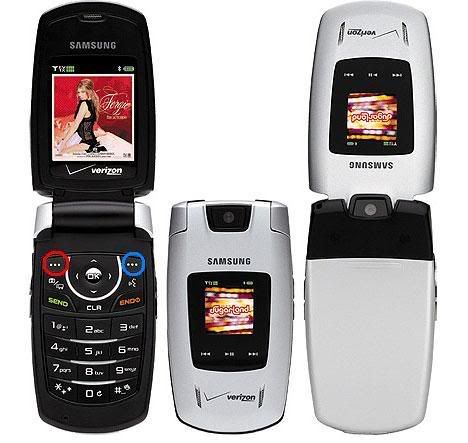
That's the cell that I have, it was one of the cheapest phones at verizon, but still has a camera and blue tooth and all that fancy crap. It came programed so that the button I circled in red goes to your text messages, and the button I circled in blue goes to your contact list. I don't remember what the arrow keys original functions were, because I reprogrammed them all..now one is my calender, one is my alarm, one is my photos, and one is um...something else that I apparently don't use very much. I use my phone as a watch/alarm clock more than anything, because actual watches usually pinch my wrist, and hardly anyone calls me.
But I guess I'm a neanderthal too, cause I usually dial my numbers anyway.
I saw this in Parade magazine in last Sunday's paper. The perfect thing for Flint. :D

I'm not going to comment on the demographic that is aimed at, and how Jitterbug knows that if you are reading an actual newspaper printed on paper, you are a member of that demographic.
Makes me feel old just thinking about it.
There's a "tow" button? That's a little excessive.
I was honsetly just wondering why a phone doesn't default to the numbers directory. Good software knows what device it is running on, and the purpose of the device, and it facilitates this function instead of burying it under layer upon layer of clicks.
I recently bought a new, expensive phone with a flip face, full keyboard and lots of other features (ENV2). Last week I returned it and went back to the simple phone (Nokia) I've been using for three years. This phone is just easier to use and, though it has fewer features, the layout and organization is much better.
Shoot, that reminds me, I've had a new phone since December and still haven't figured out how to use the bluetooth headset that worked with my last phone. New item on todays "to-do" list. I wanna be one of those cool people walking around with a big electronic earring and talking to the air.
Anyway...I agree with the original sentiment. My first cell phone (after the bag phone, LOL) had the phone list as a menu item using one of those top two buttons. Second one, I found, could do that, but I had to reprogram it and every time it shut off it would revert to the default setup (one of which was "mall", of course). Now there are all those icons floating there and you have to click around to the right one.
And every time I get a new phone, the sales geeks CLAIM that my phone book will transfer on that little chippy thing that goes in there, but they never do, and even though I have a 12 year old who loves to text me I will never be as fast as she is.
Grouse, gripe, grumble...dang newfangled gadgets.
I recently bought a new, expensive phone with a flip face, full keyboard and lots of other features (ENV2). Last week I returned it and went back to the simple phone (Nokia) I've been using for three years. This phone is just easier to use and, though it has fewer features, the layout and organization is much better.
And there you have it: salespeople like to push "features" but if you can't use the "features" because the interface with the software has been given zero consideration, then there has been a massive failure.
Software is supposed to serve the customer, not the other way around, where the customer is a slave to a clunky, ill-advised interface (and is expected to think this represents progress).
You can show her... buy her a standard numeric keypad phone, while you get one with a qwerty keypad. Then tell her she can't use txtspk with you.
Usually you can find pairing instructions on the web. Plantronics has a great walkthrough for it. PSA: folks, the Plantronics Voyager 520 is the best bt headset I've tried... and I've tried quite a few. Now that hands-free is the law, do yourself a favor and get one of these, if your phone can do bluetooth.
I have a huge, ugly blue tooth headset (
BlueParrot), but it works really well. I only use it when I'm at home, and I can also use it with my computer (with Dragon Naturally Speaking) to dictate documents.
P.S. "hands-free is the law"???
http://www.ghsa.org/html/stateinfo/laws/cellphone_laws.html
Around here it is. Check the table for the law in your area. (And no matter what the law says, never TXT and drive. You'll kill yourself and others)
I don't understand why the Yes or No buttons are included. I think it unnecessarily complicated the user interface.
Where I live, apparently it's a free-for-all. (sigh)
I was honsetly just wondering why a phone doesn't default to the numbers directory. Good software knows what device it is running on, and the purpose of the device, and it facilitates this function instead of burying it under layer upon layer of clicks.
It should. I've just been giving you a hard time.
What did you end up doing? Tweak the phone or get a different one?

