Aim

TheMercenary • Dec 20, 2007 11:15 am
When I bought my wife a new laptop last year (HP) she installed Aim Chat thinking she would be able to chat with her daughter who was in college. Well she neither chatted or used it and we have tried to remove it from her computer and can't seem to find the program. It seems buried somewhere. In the Add/Remove list of programs in the Control Pannel it is not listed. I thought if I upgraded it to the latest program it would appear, it does not. It comes on every time she boots up and the ability to turn that function off is not active in her choices even after she signs in.

1) how do I completely remove this program?

2) How do I at least get it to stop coming on when the computer boots up?
classicman • Dec 20, 2007 11:17 am
Hand grenade. That or ask mockingbird what he did with his laptop...
LJ • Dec 20, 2007 1:25 pm
just rearranging here. bump
BigV • Dec 20, 2007 1:34 pm
whoopsie!

Did I spoil your aim?
Crimson Ghost • Dec 22, 2007 12:13 am
TheMercenary;418043 wrote:
1) how do I completely remove this program?


Thermite.

Once you get rid of AIM™, go to www.meebo.com.
SteveDallas • Dec 22, 2007 12:57 am
Umm seriously did you try add/remove programs in the control panel?

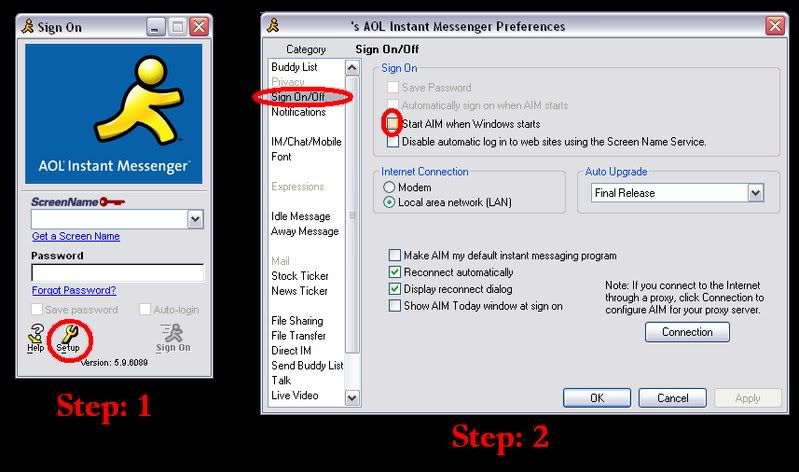
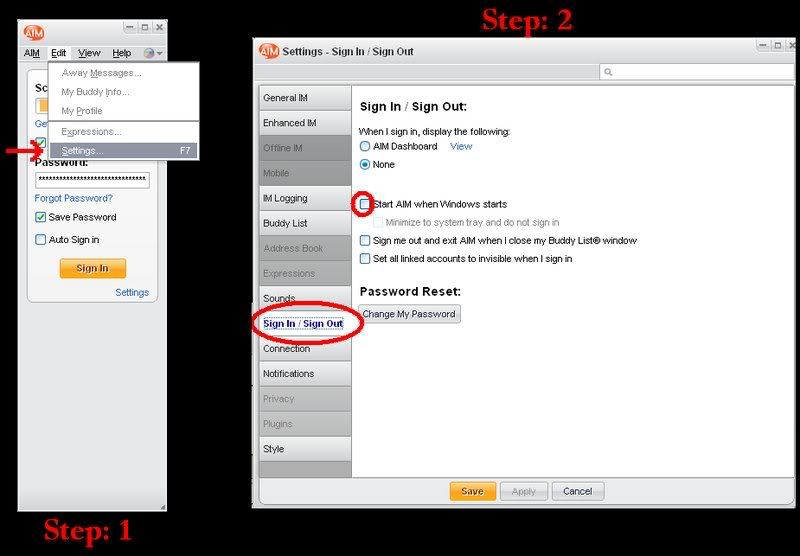
I don't remember where it is, but one of the Options tabs should have a "start every time windows starts" setting. Uncheck that and it will (should) stop loading automatically.
Razzmatazz13 • Dec 22, 2007 1:37 am
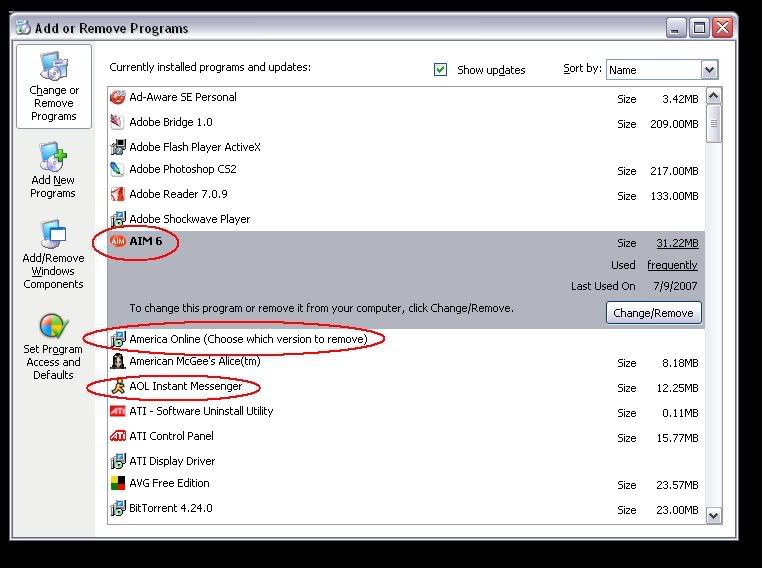
Depending on your version...does this help at all?

Image

Image

here's my program list...you can see not only both of my AIM's, but my AOL (which was been "uninstalled" and "deleted" as well....AOL is the worst virus EVAR.
(Come to think of it...when you upgrade to 6.0, it leaves the old copy on your computer, so maybe that's part of your problem?)
Image
Mockingbird • Dec 22, 2007 10:05 am
Hehe, Alice. I haven't played that game in years.
TheMercenary • Dec 22, 2007 10:17 am
SteveDallas;418544 wrote:
Umm seriously did you try add/remove programs in the control panel?

I don't remember where it is, but one of the Options tabs should have a "start every time windows starts" setting. Uncheck that and it will (should) stop loading automatically.


We tried both of those things, Aim is not listed in the "Add/Remove Programs" list.

The "start every time windows starts" tab is not available.. I think it is a grand plot.
classicman • Dec 22, 2007 1:25 pm
are you using Vista? Could that have anything to do with the problem?
tw • Dec 22, 2007 5:49 pm
TheMercenary;418043 wrote:
2) How do I at least get it to stop coming on when the computer boots up?
AOL software uses many tricks also used by malware.

Simplest place for most Startup programs: Right click on START. Open the Window for OPEN, click on PROGRAMS to open another Window, then click on the Folder called STARTUP. Search for any AOL programs. Repeat the right click on START for OPEN ALL USERS and repeate the same search down to the Startup folder. Any programs in the Startup folder will boot when Windows starts. This is the normal may of starting a program when Windows first loads.

Other ways to boot a programs and more often used by malware: Simplest solution may be in Registry. From Command Prompt, enter REGEDIT.
The HKEY_CURRENT_USER, find
Software/Microsoft/Windows/CurrentVersion/Run
This entry will be programs that execute when Windows Starts.

My open dislike of AOL products means I use the Find option in Regedit to find and then delete every entry that includes the text AOL.
busterb • Dec 22, 2007 5:52 pm
Why not just msconfig. exe ????
Undertoad • Dec 22, 2007 8:25 pm
tw;418706 wrote:
My open dislike of AOL products means I use the Find option in Regedit to find and then delete every entry that includes the text AOL.

So much for that Encarta page on Kaolin.