December 18, 2007: Illusion

xoxoxoBruce • Dec 18, 2007 9:52 am
Image

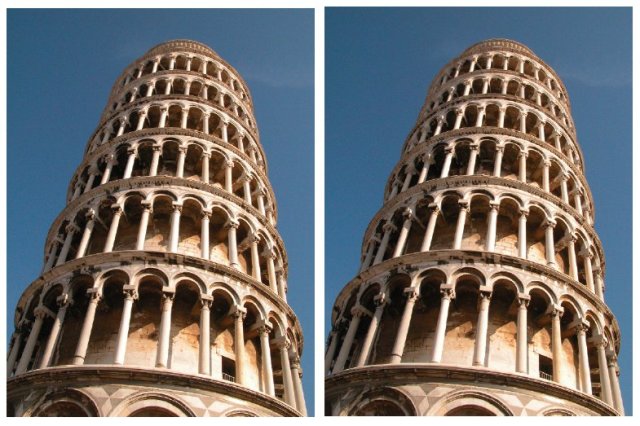
2007 First prize.
Here is a novel illusion that is as striking as it is simple.
The two images of the Leaning Tower of Pisa are identical, yet one has the impression that the tower on the right leans more, as if photographed from a different angle.
The reason for this is because the visual system treats the two images as if part of a single scene.

Normally, if two adjacent towers rise at the same angle, their image outlines converge as they recede from view due to perspective, and this is taken into account by the visual system. So when confronted with two towers whose corresponding outlines are parallel, the visual system assumes they must be diverging as they rise from view, and this is what we see.

The illusion is not restricted to towers photographed from below, but works well with other scenes, such as railway tracks receding into the distance. What this illusion reveals is less to do with perspective, but how the visual system tends to treat two side-by-side images as if part of the same scene.

However hard we try to think of the two photographs of the Leaning Tower as separate, albeit identical images of the same object, our visual system regards them as the ‘Twin Towers of Pisa’, whose perspective can only be interpreted in terms of one tower leaning more than the other.
Shawnee123 • Dec 18, 2007 9:53 am
OK, I think my brain just blew up. That is amazing!
ZenGum • Dec 18, 2007 10:07 am
Nah, that's gotta be trimmed or very subtly 'shopped ....

[gets ruler, measure screen in six points on each picture, finds perfect match]

... holy malarky, I think my brain just got discombobulated!
Phage0070 • Dec 18, 2007 10:30 am
There actually is a slight trimming; while the top portions of the image are the same the bottom portion has been altered. About where the first series of pillars meets that floor two or three pixels have been removed in a line across the second image. The images are the same size though, so on the second image you can actually see more of the structure at the bottom. The images are also slightly out of line; the second image is several pixels higher than the first image.

Imagine a two parallel slanted lines, then remove a portion from one line and mate the ends vertically, extending the bottom of the line by the same amount. What you end up with is two lines that are still parallel, but the top portion of one is farther over in the direction of the tilt. It is amazing our brains can detect such subtle manipulations, but it is not completely brain-based.
glatt • Dec 18, 2007 10:52 am
Well, this may make it even more confusing. I drew a slanted line and attached the picture twice (under different names.) Do the lines look parallel, or is the one on the right tilted more?
LJ • Dec 18, 2007 11:39 am
the seperate image thing must matter
Slothboy • Dec 18, 2007 11:52 am
Phage0070;417581 wrote:
There actually is a slight trimming; while the top portions of the image are the same the bottom portion has been altered. About where the first series of pillars meets that floor two or three pixels have been removed in a line across the second image. The images are the same size though, so on the second image you can actually see more of the structure at the bottom. The images are also slightly out of line; the second image is several pixels higher than the first image.

Imagine a two parallel slanted lines, then remove a portion from one line and mate the ends vertically, extending the bottom of the line by the same amount. What you end up with is two lines that are still parallel, but the top portion of one is farther over in the direction of the tilt. It is amazing our brains can detect such subtle manipulations, but it is not completely brain-based.


Hm. Actually I didn't believe this was unaltered either, because even if I covered one with my hand the other looked like it leaned more. But I opened up the Gimp, cut the image in half and moved one on top of the other with 50% transparency. I also increased the Flash Gordon noise and put some science stuff around. They are exactly the same.
ogwen69 • Dec 18, 2007 12:30 pm
Best IOTD ever?

but only cos my brain just exploded.
LJ • Dec 18, 2007 12:37 pm
The perspective matters, too....and i think the colors do a little bit to them as well.
classicman • Dec 18, 2007 12:39 pm
Damn LJ your whole image looks tilted to the left now!
lookout123 • Dec 18, 2007 12:44 pm
does the image change if you put the whole thing on a treadmill, though?
classicman • Dec 18, 2007 12:46 pm
The coloring of the sky looks darker to me. I have to get off this thread, my brain hurts. Think I'll go post in Ducks headache thread.
Shawnee123 • Dec 18, 2007 12:50 pm
lookout123;417621 wrote:
does the image change if you put the whole thing on a treadmill, though?


I don't know, let me ask upper management. Is that a problem?
AndyDan • Dec 18, 2007 12:53 pm
Seems to me the true test would be to reverse the two original images and see if you still get the same effect.
Phage0070 • Dec 18, 2007 1:17 pm
As I said, the shifting is very subtle and it would be difficult to see it simply by overlaying a semi-transparent image over the other. A better way is to overlay the image using the "Difference" layer quality; this method of overlay means that pixels nearly identical between the two images are made dark, while increasingly dissimilar pixels are lighter in color.

The image was compressed when it was put online, and many compression methods will leave artifacts around the edges of sharp color transitions. What would be expected from an identical image overlayed with the same compression method would be a very faint outline of sharp color transitions over an almost completely black image.

Instead we can see a sharp transition between mostly black to bright outlines, indicating the images do not match up along these transitions (where the differences are more dramatic). If the entire image was this way it would indicate the overlay was out of alignment; the fact that only sections of the image do not match suggests tampering. Once you know where to look you can see the change by alternating full opacity layers.

The first image is with the overlay matched to the bottom section. The second image has the overlay shifted down to align with the upper section. The second image shows a suggestion of another cutting about 1/3 of the way from the top, look for the horizontal bright pixels.

Image . Image
classicman • Dec 18, 2007 2:49 pm
Could you explain that in english for me? East coast if possible.

Thanks.
Clodfobble • Dec 18, 2007 4:24 pm
glatt - the lines don't work because they're not 2-D. Our brain wants the towers to be converging because we see they are getting smaller towards the top, and thus must be going "away" from us. The lines aren't getting skinnier so they must be "flat." That's why LJ's quadrilaterals that get smaller towards the top produce the illusion, but plain lines don't.
monster • Dec 18, 2007 4:41 pm
Well here they are swapped over. Does it still work?

if so, then the alterations phage is concerned about are immaterial.
glatt • Dec 18, 2007 4:47 pm
I thought of doing that too monster, but ran out of time. Good job.
sweetwater • Dec 18, 2007 9:51 pm
OK, is it because i'm new here, or does this illusion work when the image is upside down for everyone else, too?
monster • Dec 18, 2007 9:59 pm
sweetwater;417741 wrote:
OK, is it because i'm new here, or does this illusion work when the image is upside down for everyone else, too?

that's because you're standing on your head, honey. i reckon you'll fit right in, welcome! :lol:


(well either that or you're an aussie-type, which also works)
xoxoxoBruce • Dec 18, 2007 11:33 pm
Yup, works upside down, too.
Welcome to the Cellar, sweetwater.:D
JuancoRocks • Dec 18, 2007 11:35 pm
I'm leaning toward the first explanation.....:D
xoxoxoBruce • Dec 18, 2007 11:53 pm
We could discuss it over Pisa.
RellikLaerec • Dec 19, 2007 12:47 am
nah... just a pisa pisa forsa mesa
Gravdigr • Dec 19, 2007 8:16 am
[SIZE="7"]?![/SIZE]
Saphyre • Dec 19, 2007 11:27 am
My brain is broke. Whether from the image(s) or Phages explanations about trimming. :right: It's just broke.

I think I'll go look at some nice Eschers now.
Slothboy • Dec 19, 2007 11:50 am
Nice one Monster, it does still work. I did a couple more experiments. The first is I flipped the one on the left horizontally, now they appear as a mirror image, both identical.

Image

Next I flipped the one on the right as well, and suddenly the illusion is reversed and now the one on the left appears to be leaning more. Again, I didn't just flip the entire .jpg, I flipped each side individually.

Image

This is an amazing illusion. I hate my brain for trying to confuse me.
lookout123 • Dec 19, 2007 1:03 pm
ow
Laure • Dec 21, 2007 11:00 am
Phage0070, it's the SAME IMAGE. Right-click on it and select Properties. Same file path. The artifacts you show in the difference images are errors in the algorithm.
Laure • Dec 21, 2007 11:02 am
*never mind* Sorry Phage.
ZenGum • Dec 21, 2007 11:38 am
Hi Laure!
Not the most dignified entry to the cellar, but an endearing one. Welcome to the cellar.

:welcome:
busterb • Dec 21, 2007 11:45 am
What he said.
classicman • Dec 21, 2007 1:18 pm
What he said?
Shawnee123 • Dec 21, 2007 1:22 pm
What he said!
HungLikeJesus • Dec 21, 2007 3:52 pm
"What?" he said.
Razzmatazz13 • Dec 21, 2007 11:13 pm
What he said...
LJ • Dec 22, 2007 1:21 am
wah tea zed
ZenGum • Dec 22, 2007 4:59 am
What I said.
Razzmatazz13 • Dec 22, 2007 6:15 am
That's what she said!
Saraax • Dec 23, 2007 2:11 pm
Say what...
xoxoxoBruce • Dec 23, 2007 3:31 pm
Say goodnight, Gracie.
HungLikeJesus • Dec 23, 2007 6:29 pm
Goodnight Gracie.
xoxoxoBruce • Dec 23, 2007 6:35 pm
[SIZE="1"]puffing cigar [/SIZE]Goodnight Folks. [SIZE="1"]puffing cigar[/SIZE]